
Correcting a Maintenance Record
Sometimes an approved maintenance record is simply wrong — a mistyped meter reading, the wrong date, a technician's name spelled from memory. Correct this record lets you fix what the record says without pretending it always said that: every correction is kept as an entry naming who made it, what changed from and to, and why.
A correction rewrites the record. It never moves the schedule — not even when the field you are correcting is the meter reading the service counter was anchored from.
Making a correction
Open the approved record. From the equipment page, click it in the Service Requests list on the Preventive Maintenance card; or reach it from the notification email or your To-Dos.
Click Correct this record at the bottom of the page.
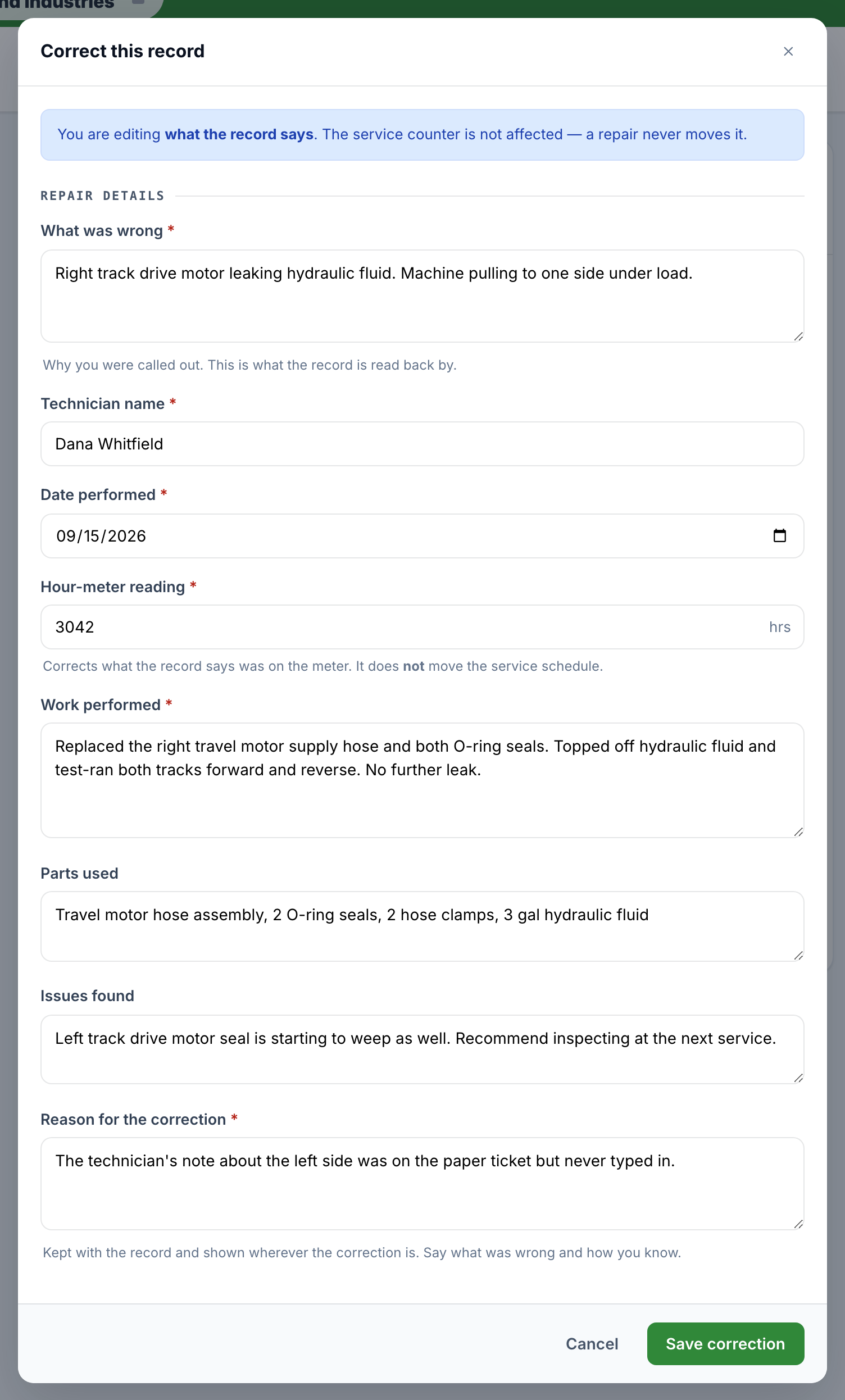
The dialog opens with the record's current values — not the original submission, so a second correction starts from the first one's result. Edit whatever is wrong.
Fill in Reason for the correction (required). Say what was wrong and how you know; it is kept with the record and shown wherever the correction is.
Click Save correction.
What you can and cannot change
Correctable: Technician name, What was wrong (on a repair), Date performed, Hour-meter reading, Work performed, Parts used, and Issues found — everything a person typed, because anything typed can be typed wrong. The same fields the original submission required are still required, so a correction cannot leave the record in a state the submission would have been refused for.
Not correctable: Photos, the signature, and the provider's own Status. Those are the provider's evidence and the record's own state, not the customer's wording — a correction that can delete the photo of the part it disagrees about is not a correction.
The schedule does not move
The dialog says this before you start, and names the numbers: the unit stays anchored where it is, and the next service is still due at the same reading. To move the schedule, use Adjust last service on the unit instead.
One consequence is worth knowing: on a corrected record the strip can say the meter at service was 640 while the counter restarted at 620. That is the rule working as intended, and the banner and correction log carry the explanation.
Where the correction shows
A corrected record always says so. The flag appears in five places:
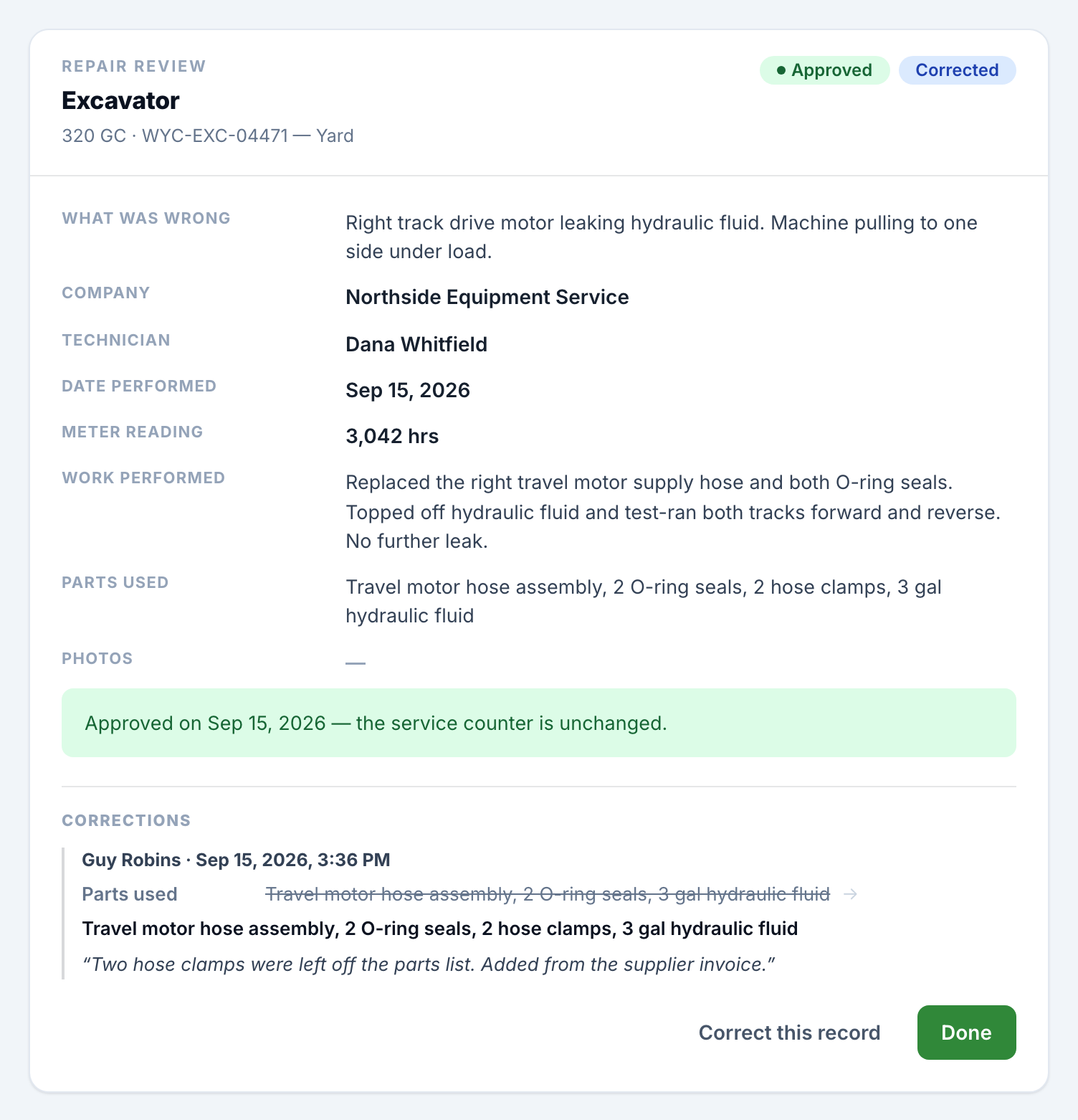
On the record itself, as a Corrected badge beside the status, with a Corrections log underneath — each entry naming the person, the timestamp, every field with its old and new value, and the reason in quotes. Corrections append, so a second sits under the first and "what did this say when it was approved" stays answerable.
On the equipment page's Service Requests list, as a Corrected tag on the row.
On the Maintenance History panels a signed-in reader sees, on web and in the mobile app. The mobile record sheet shows the full correction log too.
On the public history a provider sees at their link or on a walk-up screen — as the word Corrected and nothing else. No who, no when, no why. When a corrected record is in that list, the existing note gains one sentence explaining that a record marked Corrected was updated by the site after it was filed.
Good to know
Only an approved record can be corrected. One still awaiting review should be approved or sent back instead.
Admins and Collaborators can correct a record, and so can any of the unit's own Equipment Supervisor(s).
The provider is not notified of a correction. It is your record of your machine. What they see, if they read the history, is that the record was corrected.
Corrections are made on the web app. The mobile app shows them but does not make them.