
Recording Equipment Hours on an Audit
Equipment that uses Preventive Maintenance is tracked by runtime hours, so its schedule is only as accurate as its meter reading. To keep that reading current without a separate step, an audit performed on that equipment can capture the hour-meter reading as part of the audit. When you submit, the reading updates the equipment's current hours and, if that pushes it past its service interval, can trigger the usual maintenance notifications and work order.
This works on both the web app and the mobile app.
When the field appears
The hours field shows up automatically — there is nothing to switch on in the audit. When an audit is performed on a piece of equipment that has Preventive Maintenance enabled, a hours field appears on the audit. If the linked equipment is not tracked, no field appears. Equipment can be picked part-way through performing an audit, and the field appears or disappears with it.
Keying in the reading
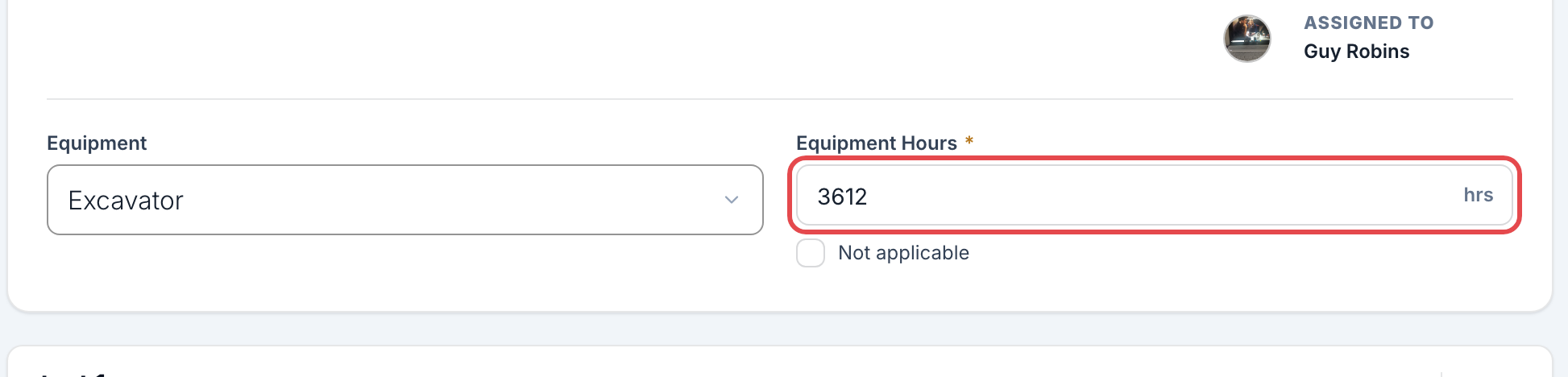
Perform the audit as usual. Near the top, you will see a field labeled with your equipment name followed by Hours (for example, Equipment Hours).
Enter the machine's current hour-meter reading. The field is required to complete the audit unless you mark it not applicable.
If the reading does not apply this time, check Not applicable. This clears the field and drops the requirement, and the equipment's hours are left unchanged.
The low-reading warning
An audit can only move the meter forward. If you enter a reading below the equipment's current hours, the field turns amber once you leave it, with a warning naming the current reading and explaining that a lower value will not update the equipment. Enter a value above the current reading, or check Not applicable, and the warning clears. Submitting a lower reading is not an error — it is simply ignored, and the counter is not rolled back.
This is different from editing the equipment record itself. An Admin or Collaborator editing the unit can lower its Current Hours — replacing an hour meter or fixing a mistyped digit is legitimate — and iReportSource records who did it. An audit is a reading taken in the field, so it never overrides a higher one. See Setting Up Preventive Maintenance.
What happens on submit
The equipment's Current Hours update to the reading you entered.
If that reading takes usage past the service interval, the maintenance triggers fire — advance notice, service-due notifications, and (when automatic work orders are on) a work order to the provider — just as they would from a manual equipment edit.
Each cycle only fires once, so keying in hours on several audits will not send duplicate work orders.
If a maintenance request is already open on that unit, no second one is created. The service-due notice still goes out and the unit still moves to Service, and the notice says which request is already open.
Good to know
The field only appears for equipment that has Preventive Maintenance turned on. To set that up, see Setting Up Preventive Maintenance.
An audit is one of only a few things that re-evaluates a unit's schedule — the others are saving the equipment record itself. A machine nobody audits and nobody edits will not notice that it has come due.
“Equipment” reflects your workspace's own naming, so the field label may read differently for you.