
Repairs vs Scheduled Services
Maintenance records come in two kinds, and the difference decides what happens to the machine's service schedule. A scheduled service is the preventive maintenance the interval exists for; approving one restarts the counter. A repair is a one-off job — something broke — and it never touches the schedule at all.
Both are recorded in full, both go through the same write-up form, and both follow the same review and approval rules. The only thing they do not share is the counter.
How a repair gets started
A repair is always started by somebody at the machine. There is no way to send one out from the equipment page, by design — a repair happens because something went wrong, not because a schedule came round.
Scan the machine's Maintenance QR code and choose Repair or other work. See Walk-Up Maintenance QR Codes.
In the mobile app, open the equipment's Maintenance section and tap Report a repair. See Performing Maintenance as an Internal Tech.
Unlike a service, a repair can be started on a unit that is not on a service schedule at all. A machine can break whether or not anybody set an interval for it.
What is different about the write-up
It asks What was wrong (required) — why you were called out. That is what the record gets read back by, and a service is never asked for it.
The form is headed Repair details, and a note says outright that filing it will not restart the service interval or change when the next service is due.
The summary card at the top shows the meter reading and nothing else. The interval and hours-since-last-service belong to the schedule, and quoting them here would imply this form is about the schedule.
The Hour-meter reading is still recorded — it is when the work happened — but its hint says plainly that it does not restart the interval.
What is different about the review
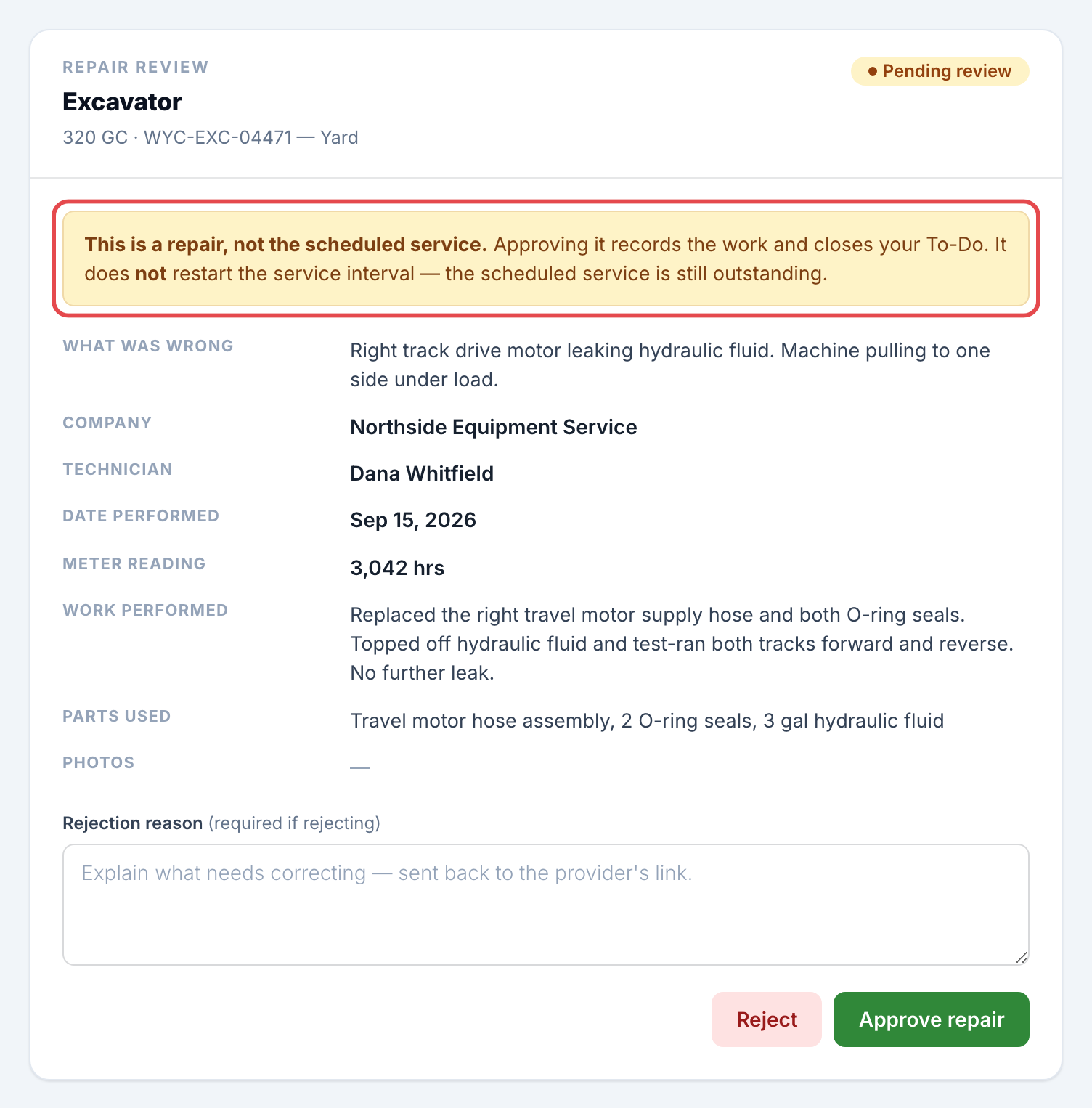
A repair follows the identical lifecycle: it can be sent for review, sent back with a reason, and approved. What changes is the copy and the consequence.
The notification reads Repair review needed and leads with the fault.
The review page is headed Repair review, and a note before the decision says that approving it records the work and closes your To-Do but does not restart the interval — naming the reading the next service is still due at, or saying the service is still outstanding if the unit is already past it.
The button reads Approve repair, and there is no reset prompt: there is no counter to restart, so there is nothing to ask.
In the review queue, a repair carries a Repair tag, and the batch confirmation counts services and repairs separately — N repairs will be recorded. They do not affect any service schedule.
The two do not block each other
Only one job of each kind is open on a unit at a time, and the counts are kept separately:
An open repair does not hold off the schedule. If the interval comes round while a repair is in progress, the work order goes out as normal.
An open service does not block a repair. A machine can break on the day its service comes due, and both records are kept.
Starting a second job of the same kind is what is prevented. Both the walk-up screen and the mobile hub offer Continue the open repair or Continue the open work order instead, so the same job gets one record rather than two.
Good to know
A repair does not satisfy a service. If the machine was due, it is still due after the repair is approved.
Repairs appear in Maintenance History and on the equipment page's Service Requests list alongside services, tagged Repair so the two are never mistaken.
The unit's Approval required setting applies to repairs and services alike.